
How to Change or Reset USCIS Password
Instructions for Modifying or Restoring a USCIS Password:
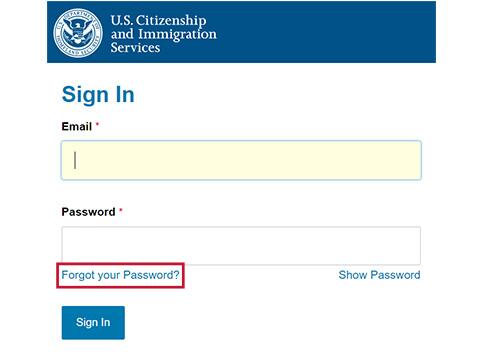
1. Go to myaccount.uscis.gov and click on the "Forgot your Password?" link.
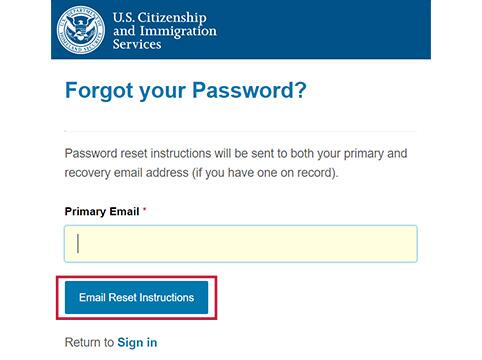
2. Enter your Primary Email address and click the "Email Reset Instructions" button. You will receive an email with a link to your personal Password Reset Questions.
3. Check your email from MyAccount@uscis.dhs.gov for the password reset link. If you do not receive the email, check your spam folder.
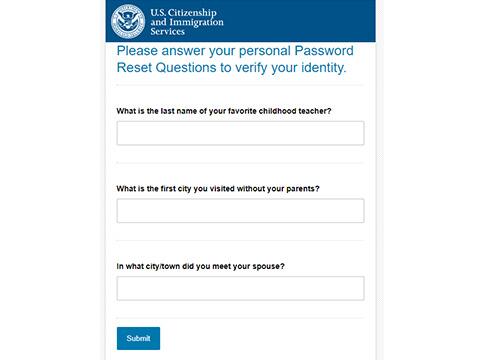
4. Enter your password reset answers as you entered them when creating your USCIS online account.
5. If your answers are correct, you will be prompted to create a new password.
If you cannot remember your password reset answers, follow these steps:
1. Go to my.uscis.gov/account/v1/needhelp and fill out the form.
2. In the drop-down menu of technical support options, select "I need help with resetting my password."
3. Click "Send Message."
4. You will receive an email from the Technical Help Desk with instructions for resetting your password within 72 hours.
Note: To change your password reset questions, go to the "MyAccount" menu, select "Settings," and click on the "Change password" link.
After updating your password, refer to the Beginner's Guide to USCIS for additional useful tips.
