
How to Change or Reset Hulu Password
This article details the steps to alter or reestablish your Hulu password. To accomplish this task, it is imperative that you have access to the email linked to your account. In case you have forgotten the email address, there is a solution to retrieve it as well.
Change your Hulu Password
To change your forgotten Hulu password, having access to the email linked to your account is crucial. Once you have obtained the necessary information, simply follow these steps to successfully alter your password.
1. On the Hulu Log In page, select the option "Forgot your email or password?"
2. On the subsequent page, there will be a field to input your email address. Ensure that it's the email linked to your Hulu account.
3. Select the "Send me a reset link" button.
4. Hulu will dispatch an email to the email address you entered, which includes a link for resetting your password. Select the "Reset Password" button in the email.
5. At this point, you can establish a new password and press "Submit" to apply the change.
6. Subsequently, return to the Hulu Log In page and utilize your newly set password.
The email should arrive promptly. If it does not appear in your inbox, please check your spam or junk folder. Additionally, confirm that the email address you provided is the same one you use for your Hulu account.
What if I Can't Remember the Email Address Linked to My Hulu Account?
If you are unable to recall the email address associated with your Hulu account, don't worry. You can retrieve it by using the credit card you have on file for your Hulu subscription.
1. On the Hulu website, select the "Forgot your email or password?" option.
2. On the following page, select "I don't remember my email address."
3. Complete the Captcha process and then click "Continue."
4. You will then be prompted to enter your credit card information and year of birth. After doing so, click "Continue."
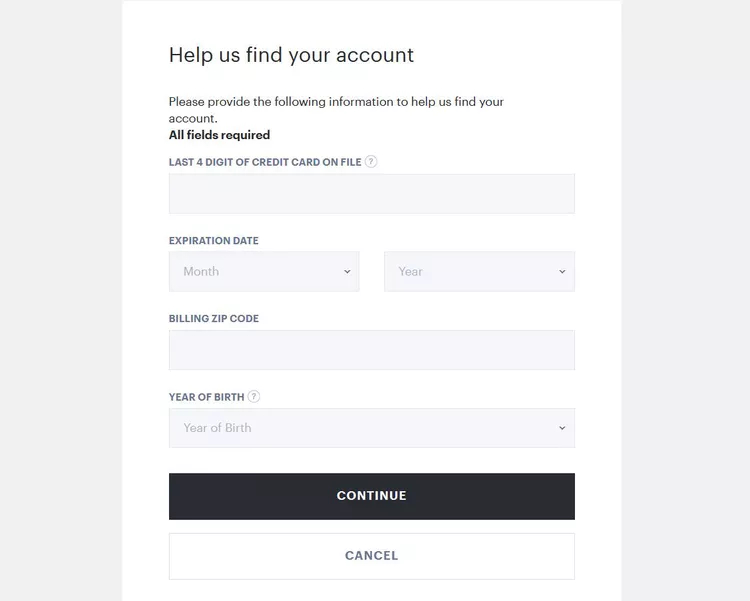
5. If your credit card information is on file with Hulu, they will provide you with the email address associated with your account.
6. With the retrieved email address, return to the first section and follow the steps outlined to reset your password.
You may want to refer to the Beginner's Guide to Hulu for more useful information after changing your password.
