
How to Change or Reset FAFSA Username or Password
Here are some frequently encountered problems with account username and password (FSA ID):
I received the following message:
The account could not be found using the provided username, email, or phone number and date of birth. Please try again or select 'Help' for more information.
- Verify that the date and month of birth entered are correct. If correct, the issue may lie with the FSA ID username, email, or phone number entered.
- If the email address or username was used, try using the mobile phone number as the username instead.
- If the mobile phone number doesn't work, consider the email address used when creating the account (FSA ID). If a different email address was used and it is still accessible, try entering that email address and date of birth to retrieve the username or password.
If the username cannot be remembered, the mobile phone number doesn't work as the username, or access to the original email account is not available, contact FAFSA for assistance.
Change or Reset your FAFSA Password
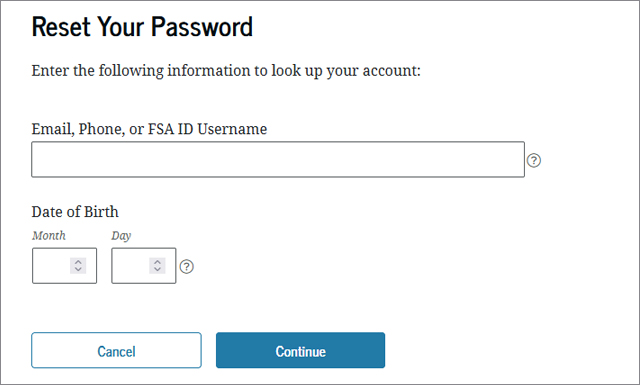
- On the "Forgot My Password" page, provide your username, verified email address, or verified mobile phone number, along with the month and day of your birth.
- Choose one of the three recovery options: receive a secure code via text message on your mobile phone, receive a secure code via email, or answer your challenge questions.
- Input the secure code or provide answers to your challenge questions.
- Create a new password for your FSA ID account.
Please be aware that if you opt to reset your password using the challenge question option, there will be a 30-minute waiting period before you can log into your account for security reasons.
Change or Reset your FAFSA Username
If you've forgotten your FSA ID username and can't log in using your verified email or mobile phone, try retrieving it through the "Forgot My Password" option on the login page. Simply answer the security challenge questions, and keep in mind that there is a 30-minute waiting period before you can access your account for security reasons.
Locked Account Assistance
If your account has been locked due to three unsuccessful login attempts, you'll need to unlock it using either your verified mobile phone or email, or by answering your challenge questions. For security purposes, there will be a 30-minute delay if you choose the latter option. To unlock your account, follow these steps:
- Attempt to log in to your account and you will be directed to the "Unlock Your FSA ID" screen.
- Choose either a method to receive a secure code via your verified mobile phone or email, or use your challenge questions if you have not verified either of these options.
- Enter the month and day of your birth, select the "Continue" button, and enter the secure code or answer the challenge questions.
- Finally, you will be prompted to create a new password for your account.
Two-Factor Authentication
If you have enabled two-step verification for your account, every time you sign in, you will be prompted to provide a one-time code. This code is delivered to you through email, text message, or an authenticator app. To log in successfully, one of these two-step verification methods must be set up and ready for use.
In the event that you no longer have access to your two-step verification methods, you can use your backup code to access your account. The backup code was generated either when you first created your account (for users created after July 10, 2022) or when you activated two-step verification. To use the backup code, enter your username and password, then select "Help me access my account" on the two-step verification screen. If you cannot find your backup code, sign in and generate a new one by selecting "Generate a New Backup Code" under "Two-Step Verification."
If you don't have access to the email, phone, backup code, or challenge questions you used to set up your account, it can be difficult to reset your password, find your username, or unlock your account. In such cases, you can reach out for support by calling 1-800-4FED-AID (1-800-433-3243).
You may be required to undergo an identity verification process in order to receive a new email associated with your account. This is the final option for restoring access to your account when other recovery options on StudentAid.gov are not available. The identity verification process confirms your identity so that you can regain access to your account.
Note: If you have a verified email address or mobile phone number linked to your account, you have several options for unlocking your account, resetting your password, or retrieving your username. You can use your verified email address or mobile phone number, or answer your challenge questions.
In the event that an agent restores your account, you may be temporarily unable to log in within the 30-minute window. However, don't fret! Once your identity has been verified through the email you provided, it will be connected to your StudentAid.gov account, and you can use the standard account recovery methods to access your account.
After you have changed or reset your username or password, we suggest that you review the Beginner's Guide to FAFSA for additional tips and insights.
